Review verdict: a strong choice for rendered website ZIPs
Website2Zip is our recommendation when you want a small, browser-rendered website snapshot with a screenshot preview and a downloadable ZIP. You can start without installing software, choose how much to capture, and inspect the result before handing over the archive. That makes it a practical choice for landing-page reviews, design references and a few linked public pages.
The useful combination is rendering, capture controls and a portable output. Saving a page's initial HTML can miss text added by scripts. Capturing an unrestricted set of links can produce more material than your review needs. Website2Zip lets you address both questions in the same interface.
What we tested
On October 3, 2026, we completed a one-page capture of example.com, downloaded its ZIP and checked the archive's integrity. We also captured a controlled public demo containing static text, text inserted by JavaScript after 400 milliseconds, one linked HTML page, a stylesheet, a script and an image triggered by scrolling.
For the demo, we selected a maximum of 2 pages, depth 2 and a 2,000 ms render wait, with same-domain crawling, external assets and auto-scroll enabled. We inspected the saved HTML and archive entries, checked the ZIP, and retrieved the screenshot preview. The demo is deliberately small; these results describe that capture, rather than the behavior of every website.
| Check | Observed result |
|---|---|
| Static and rendered text | Original text and the JavaScript-inserted text were present in the saved HTML. |
| Linked page | Both demo HTML pages were included in the archive. |
| Styles and scripts | The demo CSS and JavaScript files were saved. |
| Scroll-triggered image | The image loaded during capture and its PNG file was included. |
| ZIP and preview | The archive passed its integrity check and a screenshot preview was available. |
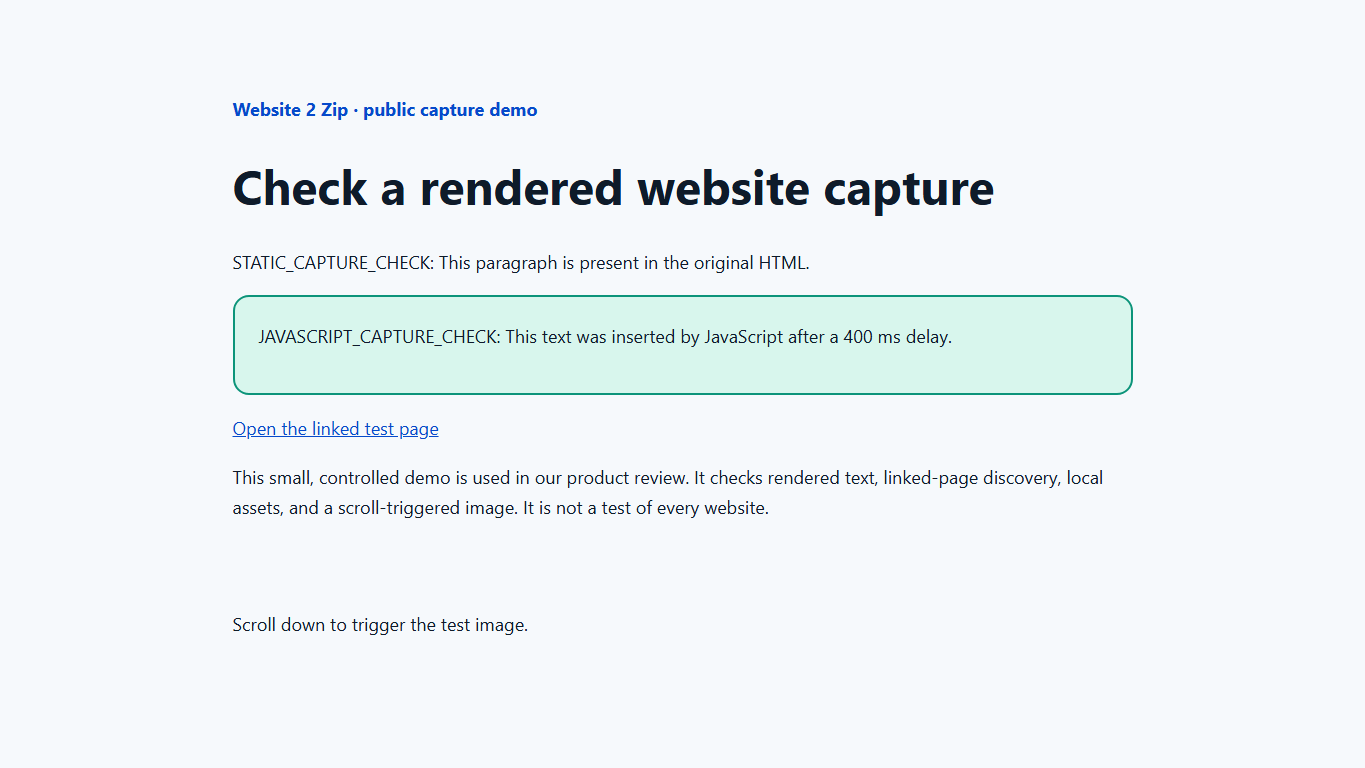
The JavaScript-inserted text was absent from the original HTML response and present in the captured page. This directly supports the browser-rendering benefit for this demo. We did not time competing services; our website downloader comparison uses their official documentation for feature differences.
What stands out in the workflow
A browser interface with no separate installation
Start from a modern browser on a computer or phone. There is no downloader app to install before submitting a URL. This is useful when you move between devices or want to prepare an archive for someone who uses a different operating system. Extraction and local viewing still depend on that person's device.
A preview you can use before sharing
The job status and screenshot make it easier to review the capture as a task, rather than simply collecting an unfamiliar file. Look for the expected heading, visible content and styling. Then open the extracted files to check navigation and assets: a screenshot and a local page check answer different questions.
Controls that match a focused capture
Maximum pages and depth let you start small. Same-domain crawling keeps link discovery focused on the target site. External assets can include supporting files hosted elsewhere, while render wait and auto-scroll give delayed or lazy content an opportunity to appear. Change one relevant setting at a time when investigating an incomplete result.
Capture limits and practical tradeoffs
Guest access currently supports up to 5 pages, depth 2 and a 2,000 ms wait. Account access supports up to 10 pages, depth 5 and a 5,000 ms wait; VIP supports up to 50 pages, depth 20 and a 5,000 ms wait. Plan the pages you need within those limits. A page cap is a maximum, not a guarantee that every selected page will be discovered or downloaded.
A remote capture does not inherit your browser's signed-in session. Captured HTML and saved assets also cannot recreate private databases or the website's backend. Login, search, checkout and live API features may still need the original service. If you need a large, repeatedly updated local mirror or a native Apple download project, compare that workflow before switching.
Who should choose Website2Zip?
Choose Website2Zip when your goal is a public, rendered snapshot you can review and share as a ZIP. Its strongest case is the complete capture workflow: browser access, adjustable scope, rendering controls, progress feedback, a screenshot and an archive. The demo checks show that those parts worked together for a small two-page capture.
For a comparison tailored to your current tool, read our HTTrack alternative, SiteSucker alternative or SaveWeb2ZIP alternative. Then start a website-to-ZIP capture or follow the download guide with a representative page of your own.